.png)
Floating Action Button (FAB)

To maximize Live show attendance, you can incorporate a widget into your website's pages.
The widget will be visible to all users browsing your website when a Live show is in progress, automatically displaying a video preview of the show. This widget can be added to any page on your website where JavaScript can be executed, informing visitors to your e-commerce site that you are currently Live.
Adding a show to the FAB feature
To add a Show to the FAB functionality, you need to enable the "Add show to FAB" checkbox when creating the show and continue adding the other parameters to the show as usual. (See create Show Page)
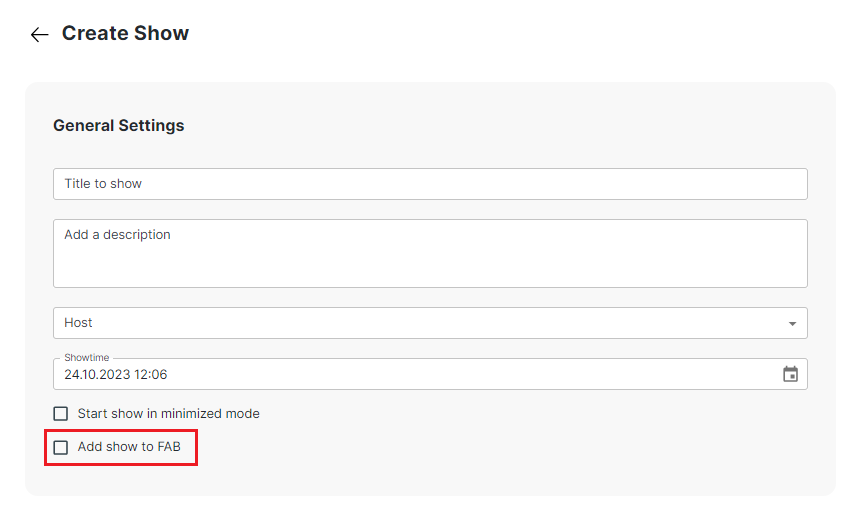
After creating the show, you can access the embedded code for the FAB by clicking on it in the back office.
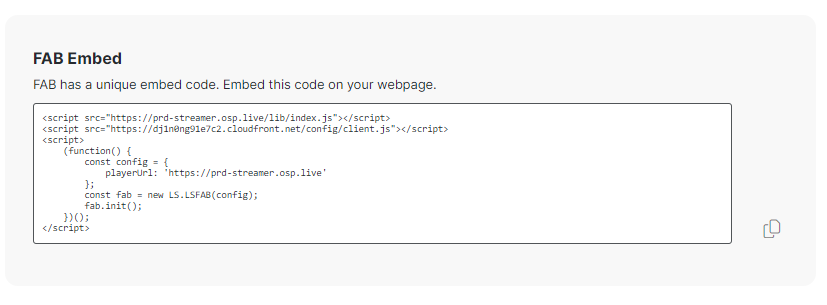
Integrate FAB into your site
Simply copy the embed code from the back office and paste it into your desired location on your site. This will display the show once it goes 'Live.' With this straightforward integration process, you can effortlessly feature your show on your site and enhance its visibility to your audience.
How it works?
The FAB script runs and retrieves the FAB widget data.
If the Show is Live, the FAB widget is immediately displayed.
If the Show is not Live, the FAB widget is either not shown or removed if it was previously displayed.
The system then schedules the next update according to the predefined schedule."
By following this process, you can ensure that your audience receives the most up-to-date information regarding your show through the FAB widget.
Status | Update Interval |
|---|---|
The show is Live (to check if the show has ended) | 30s |
The show is scheduled for up to an hour later | 30s |
No shows scheduled or shows scheduled to more than one hour later | 10min |